

Download Ultra Hal Text-to-Speech Reader – Text-to-Speech Tool, Productivity, Utility
Overview
Ultra Hal Text-to-Speech Reader is a productivity-focused application designed to convert typed text into spoken audio. The app serves as a digital assistant for individuals who benefit from auditory content delivery, such as those with visual impairments, learning disabilities, or individuals seeking hands-free reading solutions. By transforming written content into natural-sounding speech, the tool enhances accessibility and improves workflow efficiency for students, professionals, and content creators. Its primary purpose is to provide a seamless way to listen to text without the need for physical reading, making it ideal for multitasking, proofreading, or studying on the go.
The developer, Ultra Hal, has positioned this app as a lightweight, no-frills utility focused on core functionality. Although specific details about the company’s background were not provided, the app’s design philosophy emphasizes simplicity and usability. Real-world use cases include reading lengthy documents, verifying written work through auditory feedback, and supporting language learners by hearing pronunciation. In the broader app ecosystem, Ultra Hal Text-to-Speech Reader fills a niche for accessible, efficient text conversion tools that prioritize performance over visual embellishment. For users seeking a reliable, free solution to read text aloud, this app offers a focused and functional experience.
Key Features & Functionality
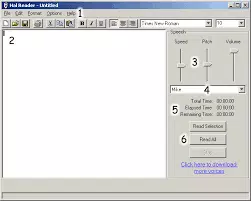
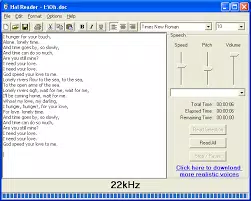
- Simple Interface – The app features a clean, minimal layout centered around a large input area for text. With no cluttered menus or complex navigation, users can begin reading text immediately. The pull-down menus for file, options, format, saving, and printing provide essential controls without overwhelming the user.
- Customizable Voice Parameters – Users can adjust speed, pitch, and volume using intuitive sliders. This allows for personalized audio output, enabling users to fine-tune the voice to match their listening preferences or specific use cases, such as slow pacing for language learning.
- Unlimited Text Input – There are no restrictions on the amount of text that can be entered. This makes the app suitable for reading entire articles, reports, or long-form content without interruption or truncation.
- Selective Text Reading – Users can highlight specific sections of text and choose to have only that portion read aloud. This feature is particularly useful for reviewing specific sentences, checking grammar, or focusing on key points without listening to the entire document.
- Downloadable Realistic Voices – The app provides a built-in link to access additional voice packs. These downloadable options enhance audio realism, allowing users to choose from a variety of voices to improve the listening experience.
Each feature is designed to serve practical needs. For example, a student can use the selective reading function to hear only the thesis statement of an essay, while a writer can use customizable speed to verify sentence flow. The unlimited input capability supports users who work with extensive content, ensuring uninterrupted playback.
Interface, UX & Performance
The user interface of Ultra Hal Text-to-Speech Reader is intentionally minimalistic, prioritizing function over form. The main workspace is a large white input area, with essential controls placed in accessible pull-down menus. Navigation is straightforward, with no hidden layers or complex workflows. This design reduces the learning curve, making the app suitable for users of all technical skill levels.
Although the developer did not list formal performance metrics, the app’s lightweight nature—18.4 MB in size—suggests efficient resource usage. It is likely to run smoothly on standard Windows systems, including older or low-end hardware. Responsiveness appears to be consistent, with text processing and audio output occurring in real time. Stability is expected given the app’s focused scope and lack of resource-heavy features.
Users can expect consistent performance across different device categories, though specific compatibility details were not disclosed. The app does not appear to rely on cloud services or external dependencies, which may contribute to its reliability and offline functionality. Overall, the UX is optimized for speed and clarity, aligning with its purpose as a utility tool.
Platform Compatibility & Technical Requirements
Ultra Hal Text-to-Speech Reader is designed for the Windows platform. The current version is 2.0, and the app has a file size of 18.4 MB. The developer did not specify minimum OS requirements, nor did they list supported Windows versions such as Windows 10, 11, or earlier editions. Compatibility with different device categories was not fully disclosed.
Given the app’s small size and utility-focused nature, it is likely compatible with most modern Windows systems. However, users should verify system requirements before installation. The app does not appear to require high-end hardware or extensive background processes, making it accessible to a broad audience.
Pros and Cons
Pros
- Free to download and use with no hidden costs
- Simple, intuitive interface suitable for beginners
- Unlimited text input capacity
- Customizable voice speed, pitch, and volume
- Supports selective text reading for precision
- Offers downloadable realistic voice options
- Lightweight at 18.4 MB, minimal system impact
Cons
- Platform limited to Windows; no mobile or cross-platform availability
- Developer did not provide detailed system requirements
- No built-in voice library—additional voices must be downloaded externally
- Interface lacks visual customization or modern design elements
- No integration with cloud storage or document import features
- Information about updates and support channels was not provided
FAQ
Is Ultra Hal Text-to-Speech Reader free to use?
Yes, the app is available at no cost. There are no subscription fees or in-app purchases required to access its core features.
Can I use this app on my smartphone?
The app is currently designed for Windows desktop systems. There is no official version available for Android or iOS devices.
Does the app support multiple languages?
Specific language support was not listed. The app may depend on system-level text-to-speech engines, which could affect language availability.
How do I install Ultra Hal Text-to-Speech Reader?
Download the installer from the official source, run the file, and follow the on-screen instructions. The app does not require administrative privileges for basic operation.
Is the app secure to download and install?
As a free utility from a known developer, the app is generally considered safe. Users should only download from trusted sources to avoid potential malware.
Final Thoughts
Ultra Hal Text-to-Speech Reader delivers a focused, reliable solution for anyone needing to convert text into spoken words. Its clean interface, customizable audio settings, and support for large text inputs make it a practical tool for students, writers, and professionals. While it lacks modern design polish and mobile availability, its core functionality is robust and well-executed. For users on Windows who value simplicity and efficiency, this app offers strong value as a free, lightweight utility. It stands out in the productivity space for its no-nonsense approach and accessibility features.
Download Ultra Hal Text-to-Speech Reader now


